How to Price and Deliver Virtual Staging as a Real Estate Photographer: Workflow, Pricing Models, and Client Expectations
Why Photographers Are Adding Virtual Staging
Virtual staging has rapidly evolved from a niche add-on to a core service in real estate photography. As more listings go to market vacant or partially furnished, listing agents increasingly want images that feel warm, relatable, and move-in ready — without the cost and logistics of physical staging.
Growing agent demand for furnished-looking listing photos
Buyers shop online first. When interiors appear empty, cold, or difficult to visualize, listings struggle to generate attention and emotional connection. Virtual staging solves that problem by:
Helping buyers understand room scale and flow
Highlighting focal points and lifestyle value
Making online thumbnails more compelling
Supporting premium pricing and faster time-to-offer
For agents, virtual staging is a low-risk investment compared to physical staging — and for photographers, it represents a scalable new revenue channel.
How virtual staging differs from physical staging and CGI rendering
Virtual staging is not the same as:
Physical staging — real furniture, rental delivery, onsite setup
CGI architectural rendering — used for pre-construction marketing
Virtual remodeling — editing structural features or finishes
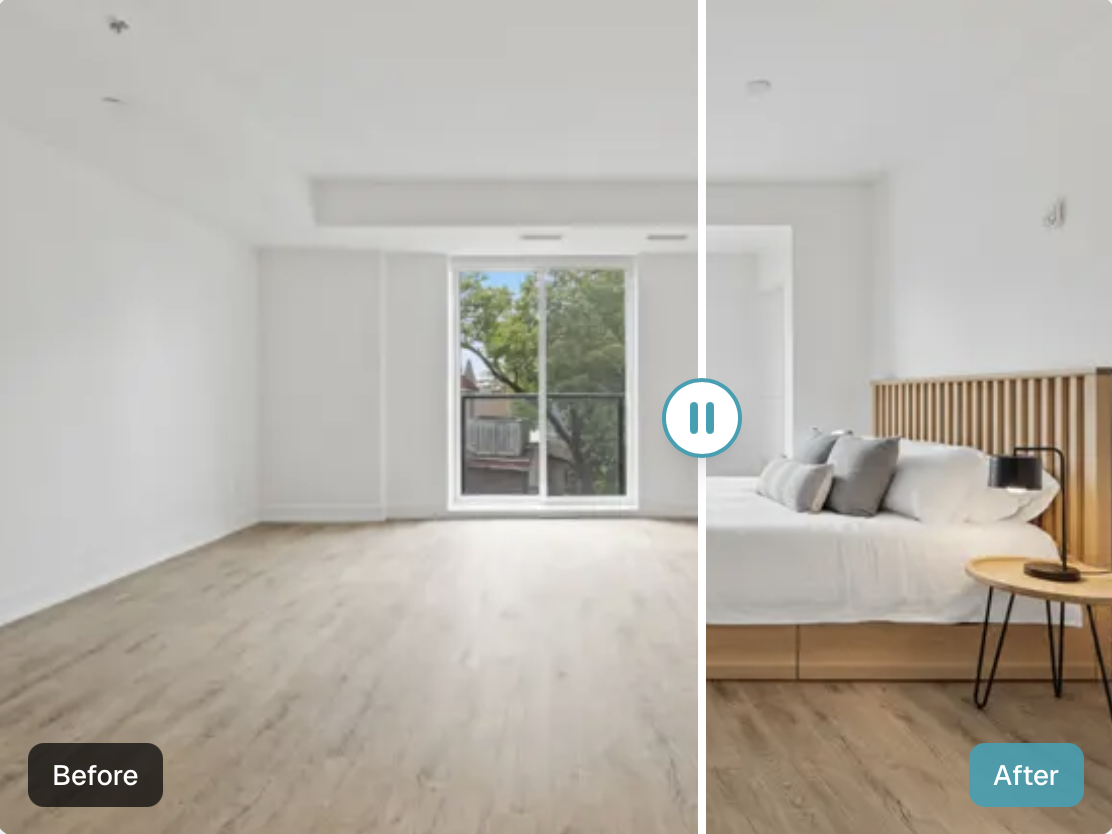
Instead, virtual staging overlays digital furniture and decor onto real listing photos. It enhances presentation without altering the underlying property.
When does virtual staging creates value for clients
Virtual staging is most impactful when:
Properties are vacant or minimally furnished
Spaces feel awkward or hard to interpret
Sellers want a premium look without staging costs
Listings target online-first buyers
As a photographer, offering virtual staging allows you to position yourself as a full-service visual marketing partner — not just a photo vendor.
How Should I Price Virtual Staging Services?
Why pricing is difficult
Costs and effort can vary widely depending on:
Whether work is outsourced, AI-generated, or produced manually
Complexity of rooms and furniture style
Client revision expectations
Licensing terms and usage context
Turnaround time or rush requests
Unlike photo shoots with predictable labor, virtual staging is a post-production service — and uncontrolled revisions can quickly erode margins.
Typical price benchmarks in the market
While pricing varies by market and quality level, common ranges include:
Per-image pricing: $25–$150+ per staged photo
Per-room pricing: $40–$200+ depending on complexity
Bulk package discounts: often offered at 3, 5, or 10-image tiers
Premium providers charge more when:
Custom furniture selection is required
Luxury listings demand style curation
Multiple revision rounds are expected
Rush delivery is requested
When to bundle vs sell as an add-on
Virtual staging generally works best as a structured add-on, not a default inclusion in your base shoot price.
Bundle staging only when:
Listings will reliably require it
The client values convenience over price transparency
You price packages to protect margins
Otherwise, keeping it separate:
Makes pricing clearer
Avoids undercutting your core photography rates
Positions staging as a premium marketing upgrade
Pricing Models That Work in Practice
There is no single “right” pricing method. The best approach is the one that balances profitability, simplicity, and client expectation management.
A. Per-Image Pricing
When it makes sense
Best for smaller jobs
Ideal for first-time clients or pilot projects
Works well when image count is unpredictable
Pros (for photographer and client)
Simple to quote
Easy to scale
Transparent cost structure
Cons
Clients may price-shop per image
Can encourage micro-orders instead of packages
Margin risk if revisions are not capped
B. Tiered Room Packages
Example tiers
3-image starter set
Kitchen + living room feature bundle
Whole-home staging package
How tiers reduce friction
Tiered packages:
Simplify quoting
Encourage larger orders
Help anchor value perception
Reduce back-and-forth during sales conversations
Clients appreciate predictable outcomes — and you benefit from higher average order value.
C. Turnaround-Based Pricing
Standard vs rush delivery
Common tiers include:
Standard (24–72 hours)
Priority (24 hours)
Same-day or rush
How to communicate SLAs
Define service levels clearly:
Delivery windows
Cutoff times
Weekend/holiday policies
Rush fees not only protect your time — they signal professionalism and reliability.
D. Recommended “Good / Better / Best” Offer Structure
A practical offer framework:
Good: Base shoot + optional per-image staging
Better: Room or bundle packages
Best: Premium turnaround + revision support
This structure works especially well with new clients who are testing your services while learning the value of virtual staging.
Cost Structure and Margin Considerations
Your profitability depends on understanding — and controlling — production costs.
Typical production cost sources
Outsourced editors
Higher manual quality
More consistent style
Higher per-image cost
AI virtual staging tools
Faster turnaround
Lower cost per image
Requires quality control & cleanup
Hybrid workflows
AI-first staging
Manual refinement for realism
Balanced cost vs quality
Recommended markup approach
A sustainable markup typically targets:
Minimum 2–3x production cost
Higher markup for complex projects or rush work
This accounts for:
Client communication
File prep and uploads
Proofing and revisions
Delivery administration
Avoiding underpricing due to hidden workflow time
Track non-editing labor, including:
Style selection
Proof approvals
Revision loops
Version management
Many photographers lose margin not on cost — but on unbilled effort.
Workflow: How to Deliver Virtual Staging Smoothly
A structured workflow improves both efficiency and client satisfaction.
A. Selecting the Right Photos for Staging
Shot types that stage best
Straight-on compositions
Wide, natural perspectives
Clean vertical lines
Minimal distortion
When to recommend decluttering first
Virtual staging is not a substitute for:
Heavy clutter
Personal items
Construction mess
Recommend light prep before staging to improve realism and credibility.
B. Style Selection & Furniture Guidelines
Match style to the target buyer
Urban condo → modern / minimalist
Suburban family home → warm transitional
Luxury listing → elevated contemporary
Ensure consistency across images
Avoid mixing:
Drastically different decor styles
Wildly varied color palettes
Consistency creates narrative flow across the listing.
C. Revisions Policy
Clearly define:
What counts as a revision
What constitutes a new render
How many revisions are included
Examples of revision:
Furniture repositioning
Color or decor swap
Examples of new render:
Full style change
Different furniture set
This prevents costly “design churn.”
D. Turnaround Time Expectations
Suggested delivery windows
Standard: 24–72 hours
Larger sets: 3–5 days
Set expectations during booking
Confirm:
Number of images
Style preferences
Revision limitations
Delivery schedule
Document agreements in writing to avoid scope creep.
Disclosure, Ethics, and MLS Compliance
Virtual staging must be used ethically and transparently.
When virtual staging must be disclosed
Most MLS boards require:
Clear labeling of staged images
Disclosure that furnishings are digitally added
Best practices for labeling staged images
Use watermarks or captions such as:
“Virtually staged”
“Digital furnishings for visualization”
Avoiding misleading edits
Do not:
Remove structural defects
Alter views or property features
Misrepresent room size or layout
Sample disclosure language photographers can provide to agents
“Some images in this listing contain virtual furnishings for visualization purposes. Property features and dimensions may appear different in person.”
Providing disclosure language adds professionalism and builds client trust.
How to Position Virtual Staging to Clients
Virtual staging delivers measurable ROI in several scenarios.
High-impact use cases
Vacant or partially furnished homes
Rental listings and corporate housing
New construction and investor flips
How to explain benefits without overselling
Position staging as:
A marketing enhancement
A way to help buyers visualize potential
Not a substitute for real-world showing experience
Upsell talking points for listing consultations
Stronger online engagement
Better first impressions
Lower staging costs vs physical staging
Faster market readiness
Frame virtual staging as strategic, not cosmetic.
Example Pricing Framework (Template)
Use this as a customizable starting point:
Starter $X per staged image 2-day turnaround 1 minor revision included
Plus Package of 5 images for $X Priority delivery Style consultation included
Premium Rush delivery Additional revision Expanded furniture style library
Notes on adjusting pricing by market
Adjust upward for:
Luxury markets
Premium brand positioning
Complex architectural spaces
Adjust downward for:
Volume-based investor work
Entry-level rental markets
Your positioning determines your price ceiling.
Common Pitfalls to Avoid
Avoid these margin-killing mistakes:
Including staging in your base photography price
Offering unlimited revisions
Using inconsistent styles across rooms
Delivering staged photos without also delivering originals
Protect your brand — and your profitability.