Best AI Interior Design Tools: 2026 Comparison Guide
What is AI Interior Design Software?
AI interior design tools use artificial intelligence, machine learning, and computer vision to automatically generate realistic room visualizations from photos, sketches, or floor plans. These platforms can:
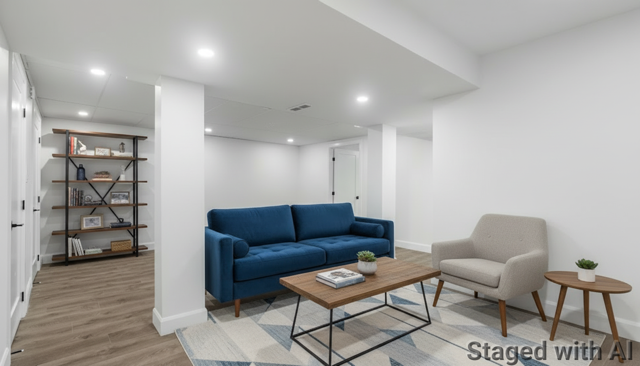
Virtual staging for empty real estate listings
Style transfer to redesign existing spaces in different aesthetics
Sketch-to-render conversion for design concepts
Furniture replacement and decluttering
Lighting and material adjustments
3D visualization and walkthroughs
The technology has evolved from experimental novelty to indispensable professional asset, with 31% of design firms already incorporating AI into daily workflows.
Comparison at a Glance
Tool | Best For | Starting Price | Key Strength |
RoomPivot | Professional teams | $29/mo (100 images) | Photorealism, team collaboration & furniture catalog |
Interior AI | Real estate virtual staging | $39/mo (200 images) | 40+ styles, fastest processing |
Spacely AI | Advanced control | $15/mo (limited credits) | Pre-design customization, color locking |
Virtual Staging AI | Budget-conscious agents | $16/mo (60 images) | Lowest cost per image ($0.28) |
Paintit.ai | Conversational design | $6.99/wk (20 images) | ChatGPT-style interface, shoppable furniture |
DecorAI | Style variety | $24/mo (unlimited) | 100+ styles, sketch-to-render |
HomeDesigns AI | All-in-one solution | Varies | Interiors, exteriors, gardens, floor plans |
Collov AI | Visual appeal | $27/mo (60 images) | Photorealistic quality, furniture shopping |
MyArchitectAI | CAD rendering | $19/mo (100 images) | SketchUp integration, accurate rendering |
Planner 5D | Floor planning | $6.99/mo | Full 3D modeling, AR visualization |
Detailed Tool Reviews
1. RoomPivot – Best for Professional Teams
Overview: RoomPivot stands out as the professional's choice with features specifically designed for collaborative workflows and consistency.
Key Features:
Natural language editing: Describe desired changes in plain English and iterate instantly
Furniture catalog: Upload your own furniture for brand-consistent, shoppable designs
Team collaboration: Shared credits across unlimited seats (Ultra plan)
Multiple style options: Curated styles plus detailed customization
Fast generation: Transform photos in seconds
Pricing:
Starter: $29/month (100 images, 1 seat)
Pro: $79/month (400 images, 5 seats)
Ultra: $199/month (1,500 images, unlimited seats)
Free trial available, no credit card required
Best For:
Real estate agencies with multiple agents
Interior design firms collaborating on projects
Furniture retailers creating brand-consistent visualizations
Contractors presenting options to clients
Pros:
Team-focused features set it apart from consumer tools
Natural language editing provides precision control
Furniture catalog enables shoppable designs
Credit pooling eliminates per-seat charges
Cons:
Higher starting price than some competitors
Newer entrant compared to established tools
Bottom Line: RoomPivot's team collaboration features and furniture catalog make it ideal for professional organizations that need brand consistency and workflow efficiency.
2. Interior AI – Best for Virtual Staging Speed
Overview: One of the most established AI design tools, Interior AI excels at rapid style transformation and virtual staging for real estate professionals.
Key Features:
40+ design styles: From modern luxury to bohemian
Virtual staging mode: Specialized tools for empty properties
Sketch2Image: Convert rough sketches to photorealistic renders
SketchUp support: Transform basic 3D models
3D flythroughs: Create video walkthroughs
Ultra-fast processing: Average generation under 60 seconds
Pricing:
Basic: $4.99/month (limited features)
Pro: $39/year ($3.25/month) for 1,000 stagings/month
Premium: Higher tier with additional features
Best For:
Real estate agents focused on listing photography
High-volume staging needs
Quick style exploration
Budget-conscious professionals
Pros:
Largest style library in market
Extremely fast processing
Excellent value for annual plans
Well-established with proven track record
Cons:
Less control over individual elements
No team collaboration features
Limited editing after generation
Bottom Line: Interior AI delivers unbeatable speed and variety for real estate professionals who need to stage multiple listings quickly and affordably.
3. Spacely AI – Best for Design Control
Overview: Spacely AI provides unprecedented control over generated designs with pre-rendering customization options.
Key Features:
Pre-design controls: Lock color palettes and styles before generation
Room-specific optimization: Tailored for different space types
Realistic Render mode: High-fidelity outputs
Auto-Furnish: Intelligent furniture placement
Priority processing: Lightning queue for higher tiers
Commercial licensing: All plans include business use
Pricing:
Free Plan: 50 trial credits (limited features)
Starter: $15/month (~200 credits)
Studio: $45/month (~600 credits)
Business: $120/month (~1,800 credits)
Credit-based system (usage varies by feature)
Best For:
Interior designers needing precise control
Clients with specific color/style requirements
Professionals willing to invest time for quality
Users who want to lock design parameters
Pros:
Exceptional control over design parameters
Clean, intuitive interface
Priority processing available
Flexible credit system
Cons:
Credit management required
Learning curve for advanced features
No team collaboration tools
More expensive per-image than competitors
Bottom Line: Spacely AI is the choice for designers who prioritize control and customization over speed and simplicity.
4. Virtual Staging AI – Best Value for Money
Overview: Virtual Staging AI focuses exclusively on one thing—staging empty properties—and does it at an unbeatable price point.
Key Features:
One-click staging: Simplified workflow
30+ design styles: Comprehensive style library
Unlimited revisions: Re-generate until satisfied
Item removal included: Declutter at no extra cost
High-resolution exports: Professional-quality images
Commercial rights: Full copyright included
API access: White-label integration available
Pricing:
Starter: $16/month (60 images) = $0.28/image
Pro: $39/month (200 images) = $0.20/image
Premium: $99/month (600 images) = $0.17/image
All plans include unlimited revisions
Best For:
Real estate agents on a budget
High-volume staging operations
Users who value simplicity
Those needing API integration
Pros:
Lowest cost per image in market
Unlimited revisions
Simple, focused interface
Excellent for bulk operations
Cons:
Limited to virtual staging only
No style editing or redesign features
Basic customization options
No team features
Bottom Line: For pure virtual staging at the lowest cost, Virtual Staging AI can't be beaten—especially for high-volume agents.
5. Paintit.ai – Best Conversational Interface
Overview: Paintit.ai revolutionizes the design workflow with a ChatGPT-style conversational interface and shoppable furniture integration.
Key Features:
Conversational AI: Natural chat-based design process
Shoppable furniture: Direct purchase links for items
Multiple design options: AI generates several variations
Clarifying questions: AI asks about your preferences
Custom style references: Upload inspiration photos
High-quality renders: Exceptional output quality
Pricing:
Weekly Plan: $6.99 (20 high-res renders)
Monthly Plan: $24.99 (100 high-res renders)
All plans include unlimited AI chats and commercial use
Best For:
Users who prefer conversational interfaces
Clients wanting to purchase featured furniture
Designers presenting multiple options
Those new to AI design tools
Pros:
Revolutionary conversational approach
Shoppable furniture is unique advantage
Multiple design variations per request
Excellent onboarding experience
Cons:
Newer platform with less track record
Limited advanced editing features
May require multiple conversations for precision
Bottom Line: Paintit.ai's innovative conversational approach and shoppable furniture make it ideal for users who want a more interactive, intuitive design experience.
6. DecorAI – Best Style Variety
Overview: DecorAI boasts the largest style library with 100+ options, making it ideal for exploring diverse design aesthetics.
Key Features:
100+ design styles: Largest selection available
Sketch-to-Interior: Convert drawings to renders
Clean interface: Streamlined user experience
Fast processing: Under 60 seconds per generation
Commercial licensing: Included in all plans
Room type selection: Optimized for specific spaces
Pricing:
Monthly: $24/month (unlimited renders)
Semi-annual: Discounted rate
Annual: Best value with further discounts
Best For:
Designers who work across many styles
Clients unsure of their aesthetic
Rapid style exploration
Sketch visualization
Cons:
Less control over individual elements
No team collaboration
Limited post-generation editing
Bottom Line: DecorAI's massive style library makes it perfect for designers and clients who want to explore numerous aesthetic directions quickly.
7. HomeDesigns AI – Best All-in-One Platform
Overview: HomeDesigns AI is a comprehensive platform covering interiors, exteriors, gardens, and floor plans in one subscription.
Key Features:
75+ interior styles: Extensive style options
Multiple modes: Beautiful Redesign, Creative Redesign, Virtual Staging
Exterior design: Facades, landscaping, gardens
Floor plan generation: Layout creation tools
Under-construction support: Works with unfinished spaces
Architectural sketches: Converts drawings to renders
Pricing:
Varies by plan tier
Multiple subscription options available
Commercial licensing included
Best For:
Full-service design firms
Homeowners doing complete renovations
Architects needing interior and exterior
Users wanting one platform for everything
Pros:
Most comprehensive feature set
Covers entire property (inside and out)
Multiple use cases in one tool
Great for large-scale projects
Cons:
Can be overwhelming for simple needs
Higher learning curve
Pricing complexity
Bottom Line: If you need interior, exterior, and landscape design in one platform, HomeDesigns AI is the most comprehensive solution available.
8. Collov AI – Best Visual Quality
Overview: Collov AI emphasizes photorealistic quality and offers a unique furniture shopping integration with 300+ US retailers.
Key Features:
Photorealistic renders: Magazine-quality outputs
360° virtual tours: Immersive property experiences
Furniture shopping: Buy items from renders (300+ retailers)
Photo enhancement: Professional-grade editing tools
Twilight conversion: Transform daytime to evening shots
Pool and lawn enhancement: Specialized outdoor tools
Pricing:
Pay-per-use model
Various credit packages available
Competitive per-image rates
Best For:
Luxury real estate marketing
High-end design presentations
Clients wanting to purchase furniture
Marketing materials requiring top quality
Pros:
Superior visual quality
Furniture shopping integration
Comprehensive photo enhancement
Specialized features (twilight, pools)
Cons:
Pay-per-use can be expensive
Less suitable for high-volume operations
Limited style customization
Bottom Line: When visual quality is paramount and clients want to purchase featured furniture, Collov AI delivers the best photorealistic results.
9. MyArchitectAI – Best for CAD Rendering
Overview: MyArchitectAI specializes in converting CAD models, SketchUp files, and sketches into photorealistic renders with exceptional accuracy.
Key Features:
CAD compatibility: Direct SketchUp and CAD support
Accurate engine: Preserves model geometry
10-second rendering: Fastest processing time
Natural language editing: Describe material changes
Style transfer mode: For hand-drawn sketches
No installation required: Browser-based
Pricing:
Basic: $19/month (100 images)
Pro: $39/month (250 images)
Premium: $79/month (500 images)
Ultra: $149/month (1,000 images)
All plans include commercial use
Best For:
Architects with 3D models
SketchUp users
Technical accuracy requirements
Design firms with existing CAD workflows
Pros:
Exceptional CAD integration
Fastest render times (10 seconds)
Geometry-accurate results
Professional-grade quality
Cons:
Less intuitive for photo-based workflow
Requires 3D model input for best results
Limited to design professionals
Bottom Line: For architects and designers working with CAD models or SketchUp, MyArchitectAI provides unmatched accuracy and speed.
10. Planner 5D – Best for Floor Planning
Overview: Planner 5D combines traditional floor planning tools with AI-powered design generation and AR visualization.
Key Features:
2D/3D floor planning: Full modeling capabilities
Drag-and-drop interface: Intuitive furniture placement
AI design suggestions: Automated layout optimization
4K rendering: High-resolution exports
AR visualization: View designs in real space via mobile
Floor plan recognition: Auto-detect dimensions from photos
Multi-platform: Web, iOS, Android, desktop
Pricing:
Free Plan: Basic features
Premium: $6.99/month for advanced features and furniture catalog
Best For:
Space planning from scratch
Full room layout design
Homeowners doing DIY design
Users wanting AR preview capability
Pros:
Complete floor planning toolkit
AR visualization unique advantage
Multi-platform availability
Extensive furniture library
Cons:
More time-intensive than instant AI
Learning curve for 3D modeling
Less suitable for quick staging
Bottom Line: Planner 5D is ideal when you need full floor planning capabilities combined with AI assistance, especially for complete redesigns from scratch.
How to Choose the Right AI Interior Design Tool
By User Type
Real Estate Agents:
High Volume: Virtual Staging AI (best value) or Interior AI (speed)
Premium Listings: Collov AI (quality) or Paintit.ai (shoppable)
Team Operations: RoomPivot (collaboration features)
Interior Designers:
Client Presentations: RoomPivot (control) or Paintit.ai (options)
Multiple Styles: DecorAI (100+ styles)
CAD Integration: MyArchitectAI (technical accuracy)
Complete Projects: HomeDesigns AI (interior + exterior)
Architects:
Rendering: MyArchitectAI (SketchUp integration)
Comprehensive: HomeDesigns AI (all features)
Homeowners:
DIY Planning: Planner 5D (floor plans + AR)
Quick Ideas: Interior AI (affordable, fast)
Inspiration: DecorAI (style variety)
Furniture Retailers:
Brand Consistency: RoomPivot (furniture catalog)
Shoppable Rooms: Paintit.ai or Collov AI (purchase integration)
By Budget
Budget-Conscious (<$20/month):
Virtual Staging AI – $16/month (best value)
Spacely AI – $15/month (good control)
Planner 5D – $6.99/month (full features)
Paintit.ai – $6.99/week (short-term projects)
Mid-Range ($20-50/month):
DecorAI – $24/month (unlimited renders)
RoomPivot – $29/month (team features)
Interior AI – $39/month (speed + variety)
MyArchitectAI – $19-39/month (CAD integration)
Professional/Team ($50-200/month):
RoomPivot Pro/Ultra – $79-199/month (collaboration)
Spacely AI Studio/Business – $45-120/month (advanced control)
HomeDesigns AI – Various tiers
MyArchitectAI Premium/Ultra – $79-149/month
By Key Feature Priority
Speed:
MyArchitectAI (10 seconds)
RoomPivot (<30 seconds)
Interior AI (<60 seconds)
Quality:
Collov AI (photorealistic)
MyArchitectAI (technical accuracy)
Paintit.ai (high-quality renders)
Control:
Spacely AI (pre-design parameters)
RoomPivot (natural language editing)
Planner 5D (full manual control)
Value:
Virtual Staging AI ($0.28/image)
Interior AI (annual plan value)
DecorAI (unlimited renders)
Team Collaboration:
RoomPivot (built for teams)
HomeDesigns AI (team features)
Most others lack team functionality
Style Variety:
DecorAI (100+ styles)
Interior AI (40+ styles)
Virtual Staging AI (30+ styles)
AI Interior Design vs. Traditional Methods
Cost Comparison
Traditional Physical Staging:
Average cost: $2,000-$5,000 per property
Furniture rental: $500-$1,500/month
Professional stager: $75-$150/hour
Timeline: 1-2 weeks
Traditional Virtual Staging (Human-Made):
Cost: $30-$300 per photo
Timeline: 1-3 days per image
Revisions: Additional charges
AI Virtual Staging:
Cost: $0.28-$5 per image
Timeline: 30-60 seconds per image
Revisions: Often unlimited or minimal cost
Annual Savings Example: A real estate agency with 10 agents staging 100 properties annually:
Traditional: $200,000-$500,000
AI Staging: $1,000-$5,000
Savings: $195,000-$499,000 (98-99% reduction)
Time Comparison
Task | Traditional | AI Solution | Time Saved |
Virtual staging one room | 2-4 hours | 30 seconds | 99.8% |
Complete property (6 rooms) | 12-24 hours | 3 minutes | 99.8% |
Style exploration (5 options) | 10-20 hours | 2.5 minutes | 99.8% |
Client revisions | 2-4 hours | 30 seconds | 99.8% |
Quality Considerations
AI Advantages:
Instant iterations
Unlimited style options
Consistent quality
No physical limitations
Traditional Advantages:
Human understanding of space functionality
Client relationship building
Custom solutions for unique challenges
Building code compliance
Best Practice: Many professionals now use AI for initial concepts and visualization, then apply human expertise for refinement and implementation.
Key Trends in AI Interior Design (2025)
1. Conversational AI Interfaces
Tools like Paintit.ai are pioneering ChatGPT-style interactions, making design more accessible to non-professionals.
2. Shoppable Designs
Integration with furniture retailers (Paintit.ai, Collov AI) lets clients purchase featured items directly, creating new revenue streams.
3. Team Collaboration Features
Professional tools like RoomPivot are adding multi-user workflows, shared credit pools, and project management capabilities.
4. Enhanced Realism
Rendering quality has dramatically improved, with many tools now producing magazine-worthy photorealistic images.
5. Natural Language Editing
Describing changes in plain English (RoomPivot, MyArchitectAI) eliminates the need for technical knowledge or manual editing.
6. Multi-Function Platforms
Comprehensive solutions (HomeDesigns AI) now handle interiors, exteriors, landscaping, and floor plans in one subscription.
7. AR Integration
Mobile apps (Planner 5D, Collov AI) let users visualize designs in real space using augmented reality.
8. Faster Processing
Generation times have dropped from minutes to seconds, with some tools (MyArchitectAI) rendering in just 10 seconds.
Common Challenges and Solutions
Challenge: AI Results Look Unrealistic
Solution:
Use tools with better rendering quality (Collov AI, MyArchitectAI)
Provide higher-quality input photos (good lighting, proper angles)
Use "accurate" or "realistic" mode when available
Iterate multiple times and select best result
Challenge: Furniture Placement Seems Off
Solution:
Try tools with better spatial awareness (Spacely AI, RoomPivot)
Use natural language editing to adjust specific items
Provide reference images showing desired layout
Consider tools with manual adjustment capabilities
Challenge: Can't Match Client's Exact Vision
Solution:
Use conversational tools (Paintit.ai) that ask clarifying questions
Tools with custom style upload (DecorAI, Spacely AI)
Iterate with natural language edits (RoomPivot, MyArchitectAI)
Start with closest preset style, then refine
Challenge: Need Brand-Consistent Designs
Solution:
RoomPivot's furniture catalog feature
Upload custom style references to DecorAI or Spacely AI
Use tools allowing color palette locking
Challenge: Too Expensive for Volume
Solution:
Virtual Staging AI ($0.28/image) for pure staging
Interior AI annual plan (best value for variety)
DecorAI unlimited plan ($24/month)
Challenge: Team Can't Collaborate
Solution:
RoomPivot (designed for teams with shared credits)
Consider enterprise plans from major providers
Use cloud storage for sharing individual accounts
Best Practices for Using AI Interior Design Tools
For Real Estate Agents
Photograph Properly: Good input = good output. Shoot in natural light, use wide angle, and capture full room.
Consistent Style: Use similar styles across all rooms in a property for cohesive listings.
Disclose AI Usage: Be transparent with buyers that images are virtually staged.
Keep Originals: Always include actual property photos alongside staged versions.
Match Market: Use styles appropriate for your target buyer demographic.
For Interior Designers
Use as Concept Tool: Generate quick options for client review, then refine manually.
Combine with Expertise: AI can't replace understanding of space functionality and building codes.
Multiple Iterations: Generate several options to give clients choices.
Brand Consistency: Upload custom furniture catalogs or style references when available.
Technical Follow-Up: Use AI visuals to sell concepts, then create proper technical drawings.
For Homeowners
Start Simple: Begin with your current room photos before attempting blank slate designs.
Try Multiple Styles: Experiment widely—you might discover styles you wouldn't have considered.
Consider Practicality: Beautiful renders may not account for real-world constraints (windows, doors, outlets).
Use as Inspiration: Treat results as starting points rather than exact blueprints.
Verify Feasibility: Consult professionals before committing to major renovations based on AI designs.
ROI Analysis for Professionals
Real Estate Agents
Investment:
Virtual Staging AI: $16-39/month
Time: ~5 minutes per property
Returns:
Properties with staging sell 73% faster
Virtual staging increases offers by 1-5%
Average listing views increase by 35%
Can stage multiple properties simultaneously
Example: Agent sells 20 homes annually, average price $400,000:
5% price increase = $20,000 more per home = $400,000 annual increase
Agent commission (3%) = $12,000 additional income
Tool cost: $480/year
ROI: 2,400% return
Interior Designers
Investment:
Spacely AI or RoomPivot: $15-79/month
Time: 30 minutes per client presentation
Returns:
3x more concept options per meeting
Can serve 20-30% more clients
Higher client satisfaction and referrals
Win rate increases 15-25%
Example: Designer bills $10,000/project, completes 24 projects annually:
20% more clients (4.8 additional) = $48,000 additional revenue
Tool cost: $948/year
ROI: 4,963% return
Architecture Firms
Investment:
MyArchitectAI: $79-149/month
Integration time: 2-4 hours initial setup
Returns:
Client presentations 10x faster
More proposals submitted (higher win rate)
Better client communication
Reduced rendering costs
Frequently Asked Questions
Is AI virtual staging legal?
Yes, AI virtual staging is legal, but disclosure is important. The National Association of Realtors and most MLS systems require clear disclosure that images are virtually staged. Always include both staged and unstaged photos in listings.
Can buyers tell the difference between AI staging and real staging?
Modern AI staging tools produce photorealistic results that are often indistinguishable from professional photography. The quality depends on the tool and input photo quality. High-end tools like Collov AI and MyArchitectAI create images that match or exceed traditional virtual staging.
Do I own the rights to AI-generated images?
Most AI interior design tools grant full commercial rights to generated images with paid plans. Always verify the specific licensing terms:
Virtual Staging AI: Full copyright included
RoomPivot: Commercial use allowed
Interior AI: Commercial license with Pro+
Always check individual tool terms
How accurate are AI staging results?
AI staging accurately represents styles, colors, and furniture placement, but may not account for:
Exact dimensions and scale
Physical constraints (doors, windows, outlets)
Building codes
Structural requirements
Use AI staging for visualization and inspiration, but consult professionals for implementation.
Can AI tools work with poor quality photos?
Results depend heavily on input quality. Best results require:
Good natural lighting
Wide-angle perspective showing full room
High resolution (minimum 1920x1080)
Minimal distortion
Clear spatial boundaries
Most tools can work with smartphone photos if taken properly.
Which tool is best for virtual staging real estate?
Best overall value: Virtual Staging AI ($0.28/image) Best speed: Interior AI (<60 seconds) Best quality: Collov AI (photorealistic) Best for teams: RoomPivot (collaboration features)
Choice depends on your priority: cost, speed, quality, or team features.
Can I use AI tools for commercial projects?
Most paid plans include commercial licensing, but verify specific terms:
Included: Virtual Staging AI, Interior AI (Pro+), RoomPivot, Spacely AI
Limited: Some free plans restrict commercial use
API Options: Virtual Staging AI offers white-label API access
How long does AI staging take?
Generation: 10-60 seconds per image
Setup: 1-2 minutes (upload, select style)
Iterations: 30 seconds each for revisions
Total: 3-5 minutes per room including iterations
Compare to traditional virtual staging: 2-4 hours per room.
Do I need design experience to use these tools?
No design experience is required for most tools:
Beginner-friendly: Virtual Staging AI, Interior AI, Paintit.ai
Intermediate: Spacely AI, DecorAI, HomeDesigns AI
Advanced: MyArchitectAI (CAD knowledge helpful), Planner 5D (3D modeling)
Conversational tools like Paintit.ai are especially accessible to beginners.
Can AI replace interior designers?
No. AI tools are powerful assistants but cannot replace human expertise:
AI Strengths:
Rapid visualization
Style exploration
Cost-effective iterations
Initial concept generation
Human Essential:
Understanding client needs and lifestyle
Space functionality and flow
Building codes and regulations
Material selection and sourcing
Project management
Custom problem-solving
Best practice: AI generates options, humans provide expertise and refinement.
Conclusion: Which Tool Should You Choose?
The best AI interior design tool depends on your specific needs, budget, and workflow:
Quick Recommendations
For Real Estate Agents:
Budget choice: Virtual Staging AI ($16/month, $0.28/image)
Speed choice: Interior AI ($39/month, <60 seconds)
Quality choice: Collov AI (pay-per-use, photorealistic)
For Interior Designers:
Control focus: Spacely AI ($15-120/month, advanced parameters)
Style variety: DecorAI ($24/month, 100+ styles)
Innovation: Paintit.ai ($24.99/month, conversational AI)
For Design Teams:
Best collaboration: RoomPivot ($29-199/month, team features)
All-in-one: HomeDesigns AI (comprehensive platform)
For Architects:
CAD integration: MyArchitectAI ($19-149/month, SketchUp support)
Comprehensive: HomeDesigns AI (interior + exterior)
For Homeowners:
DIY planning: Planner 5D ($6.99/month, floor plans + AR)
Quick inspiration: Interior AI ($4.99/month basic)
The Bottom Line
AI interior design tools have matured from experimental novelties to essential professional assets. They deliver 98-99% cost savings compared to traditional staging, generate results in seconds instead of days, and produce photorealistic quality that matches or exceeds human-made alternatives.
However, these tools work best as assistants rather than replacements for human expertise. Use AI to rapidly explore options, generate client presentations, and visualize concepts—then apply professional judgment for refinement and implementation.
Start your AI interior design journey:
Identify your primary use case (staging, design, collaboration)
Try free trials of 2-3 tools matching your needs
Test with real projects to evaluate results
Choose based on actual performance, not marketing claims
Integrate into your workflow gradually
The future of interior design is human creativity enhanced by AI capability. By choosing the right tool and using it effectively, you can dramatically improve your efficiency, expand your creative options, and deliver better results to clients—all while reducing costs and time investment.
About RoomPivot
RoomPivot represents the evolution of AI interior design tools toward professional team collaboration. With natural language editing, custom furniture catalogs, and shared credit pools, RoomPivot is specifically designed for real estate professionals.
Learn more at www.roompivot.com
This comparison was last updated December 2025. Pricing and features may change. Always verify current information on vendor websites before purchasing.